AI · 2026-09-03
Grok Bot is an always-on teammate. Here is how a Quebec plant should actually use it.
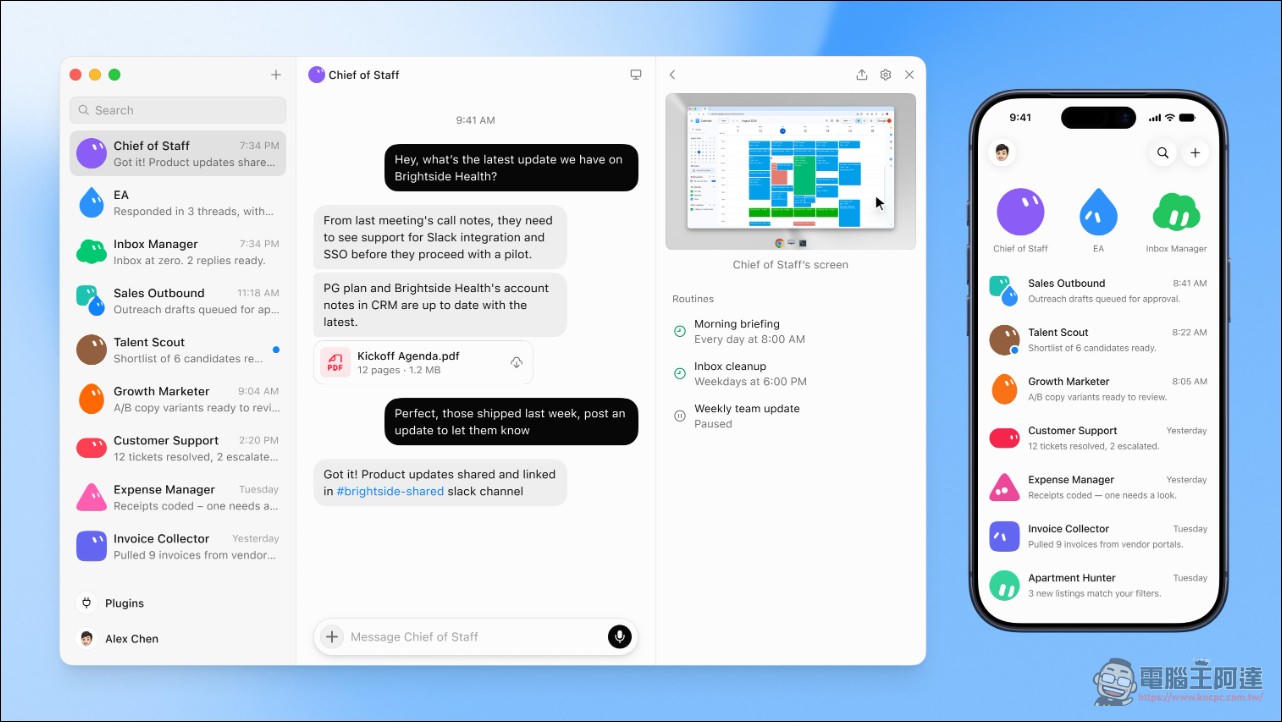
On 11 August 2026, xAI (they now sign as SpaceXAI) opened Grok Bot in beta. Their sentence is simple: it is a team of always-on agents. Each Bot has a name. Each Bot has its own cloud computer. It signs into the tools you already use, the way a person would, and it keeps going after you lock the laptop. It only comes back when something needs your approval.
That last clause is the whole post. A Quebec plant does not need eight extra arms. It needs a helper that drafts, sorts, and waits. Grok Bot, used the way xAI actually suggests, is closer to a named intern with a desk than to a chatbot. Used like a magician, it is a cloud computer with your logins. We will be boring about the difference.
What Grok Bot is, in plant language
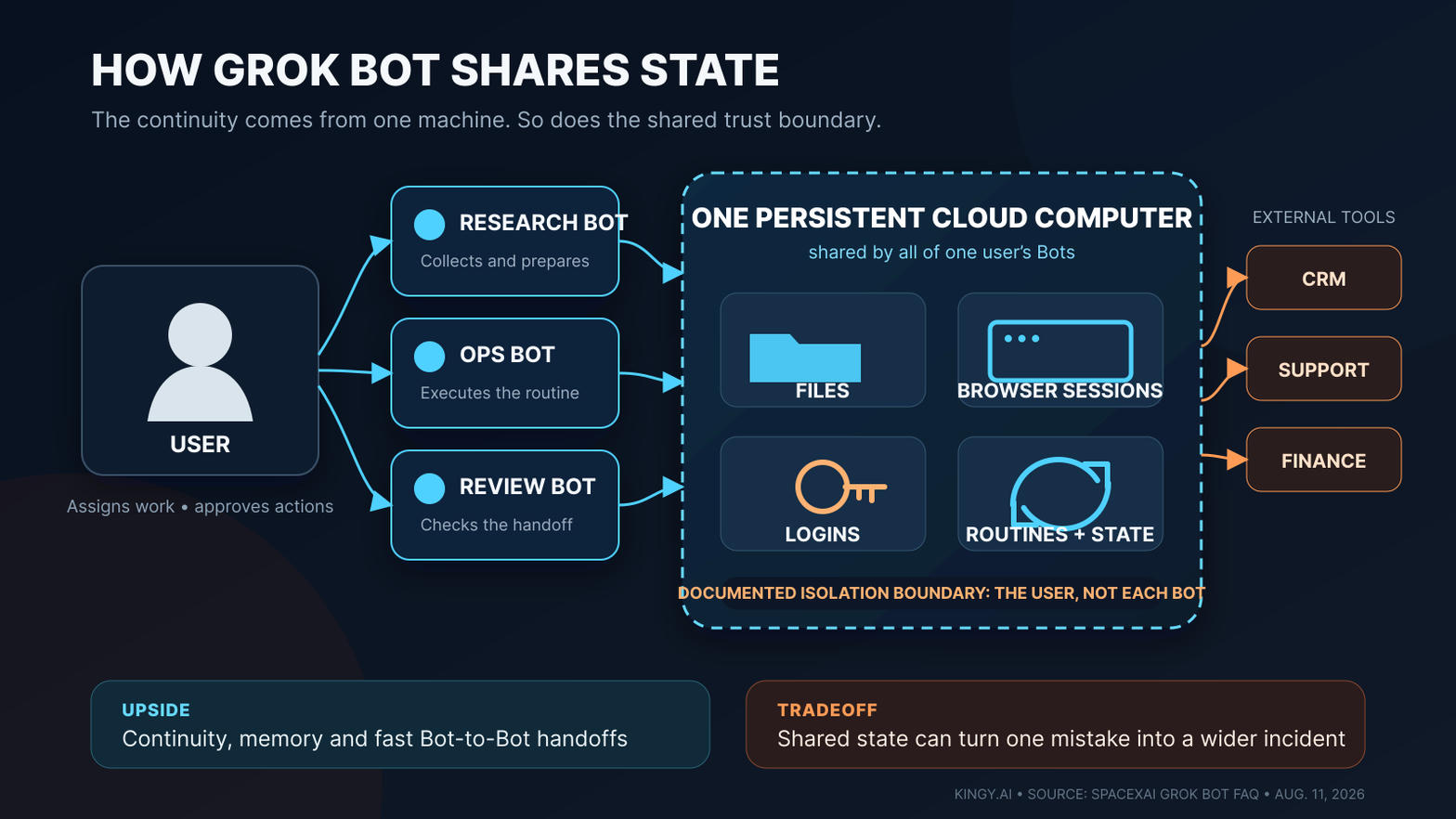
Grok is the chatbot. Grok Bot is not that with a longer memory. It is a separate product. A Bot is a persistent, named agent. It keeps files, browser sessions, and preferences. All of your Bots share one cloud computer (files, logins, sessions), which is how they hand work to each other. xAI is explicit: the isolation boundary is the user account, not each Bot. That is useful to remember before anyone signs the Bot into the ERP.
xAI’s own design note, published today, 3 September 2026, says the main objects are Bots, not conversations. You come back tomorrow to the same teammate. Work can start without you: a schedule, an event, or another Bot. The interface has three levels for the computer: a status light, a side preview, and a full-screen takeover when the Bot is stuck. That is the playbook they want you to learn. Glance. Do not micromanage. Sit down only when it asks.
What xAI actually tells you to do
Their launch post is not a pile of APIs. It is a hiring manual. Give the Bot a name and a job. Show it the workflow once: “follow along the next time I do this.” It saves the path as a routine. Run the routine on a schedule. Keep anything irreversible behind your approval. Start with one Bot. Add specialists (inbox, invoices, follow-ups) and put a Chief of Staff on top if the roster grows. Do not check in every fifteen minutes. Emma, in operations at xAI, said the Bots asked her why she kept asking so many questions.
Roman, on the product team, said the thing we have been saying about Copilot for two years: there is a huge difference between 90% done and 100% done. Most AI gets you almost there. Grok Bot can finish the swing because the work lands in the actual tool. For a plant, “the actual tool” is mail, the vendor portal, the scanner folder, maybe SharePoint. It is not, on day one, the button that posts a purchase order in Infor Visual.
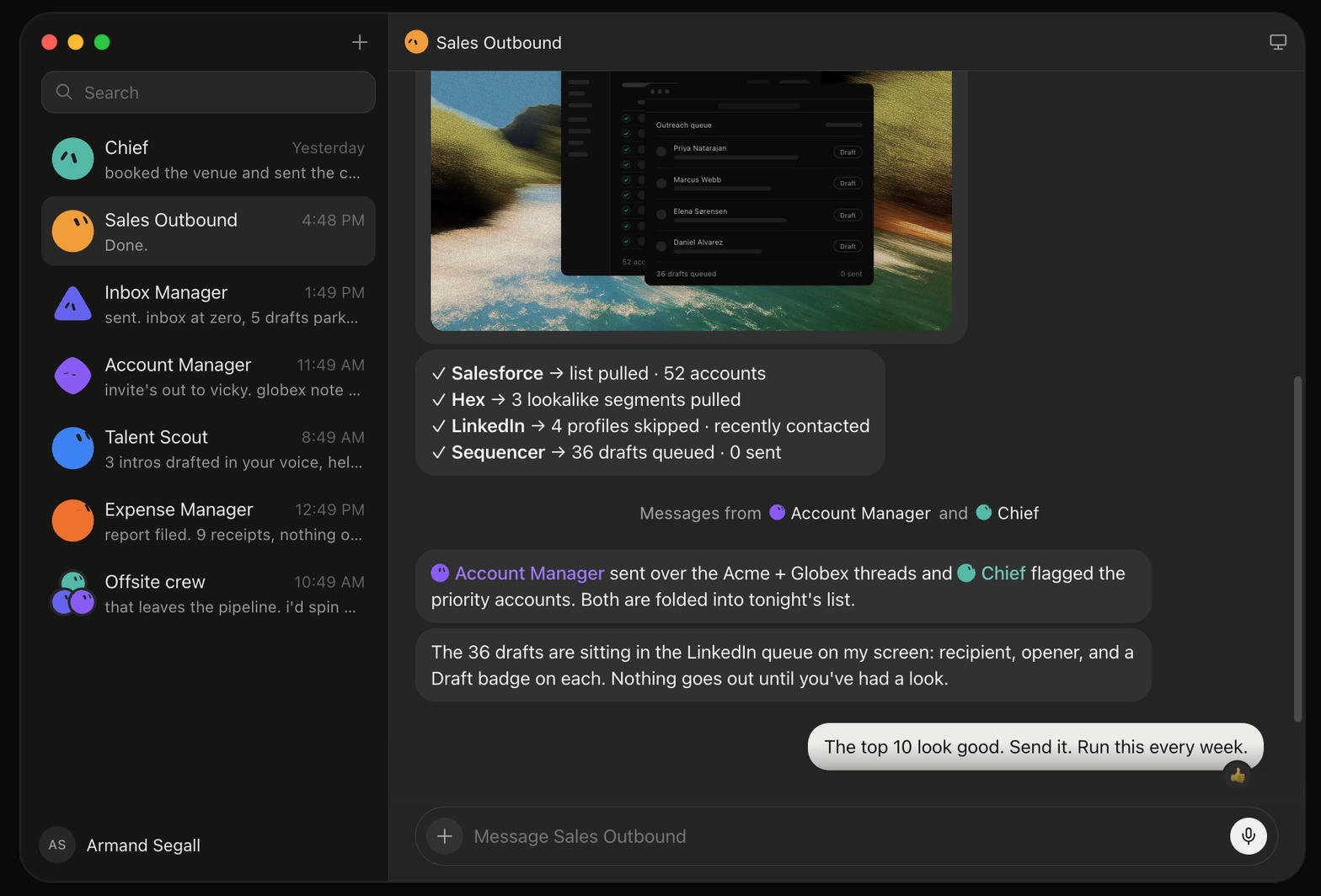
Scenario 1. Tuesday at receiving, Shawinigan
A mid-size fabricator. Packing slips still arrive three ways: PDF in a shared mailbox, a scan at the dock, a photo from a driver’s phone. Two people retype the same lines into the ERP. Exceptions live in highlighter. This is the job xAI would file under Vendor Portal Operator plus Invoice Coordinator: click the path that has no clean API, come back with exceptions only.
What we would actually stand up. A Bot named Receiving. You sit with it once. You open the mailbox, you drop the PDF, you show it the purchase order on the ERP screen (look, do not type). You mark the three fields that must match. Then you write the rule out loud: “If it matches, draft the receipt. If it does not, put it in my approval pile with the photo and the PO side by side. Never post.” That is xAI’s ‘follow along once’ plus GOX’s human gate.

Overnight, Receiving works on the cloud computer. At 6:50 a.m. the dock lead gets a short note: 19 slips matched, 4 exceptions, 1 unreadable thermal label. She approves the nineteen in a batch. She walks the four. The ERP is still hers. If a vendor later asks “who posted this?”, the answer is a name, not a model card.
Scenario 2. The AP mailbox that ate Thursday
xAI’s catalogue has Invoice Coordinator and Expense Manager: forward invoices, match what you can, nudge the owner. For a distributor in Centre-du-Québec, that mailbox is 40 PDFs a day, three formats, and a finance person who is also the backup for payroll.
Bot named Invoices. Routine: every hour, read the mailbox, classify supplier, extract the total and the PO, match against the open order. Draft the coding from last time this supplier was paid. Flag the odd ones (new bank, round number, first-time vendor). Park a batch for the controller. The Bot does not click “pay”. xAI says the same thing in their sales examples: drafts sit in a queue until you look.
The gotcha, which their security docs are honest about: all Bots share the computer and the logins. If Invoices is signed into the bank portal “just to download the PDF”, Receiving can see that session too. For a plant, that is a Fortinet and identity conversation, not a prompt conversation. We would keep the Bot in mail and SharePoint. The bank stays a person.
Scenario 3. The unofficial Copilot person, promoted
You know this human. They already explain Copilot to everyone. They get the 7 p.m. call when the demo hits a real invoice. xAI would hand them Inbox Manager and Ticket Triage Specialist: sort the queue, draft replies, stay quiet when it is clean, every send behind approval.
On a GOX helpdesk, that is gold if we wire it to the portal, not to a personal Gmail. The Bot watches the named queue. It drafts the first answer from the SOP library. It never closes a P1. It never mails a customer until the tech on shift hits send. The unofficial Copilot person stops being the runtime. They become the person who owns the exceptions and the weekly “what did the Bot get wrong” review. That is a job. It is also how Emma at xAI stopped checking every fifteen minutes.
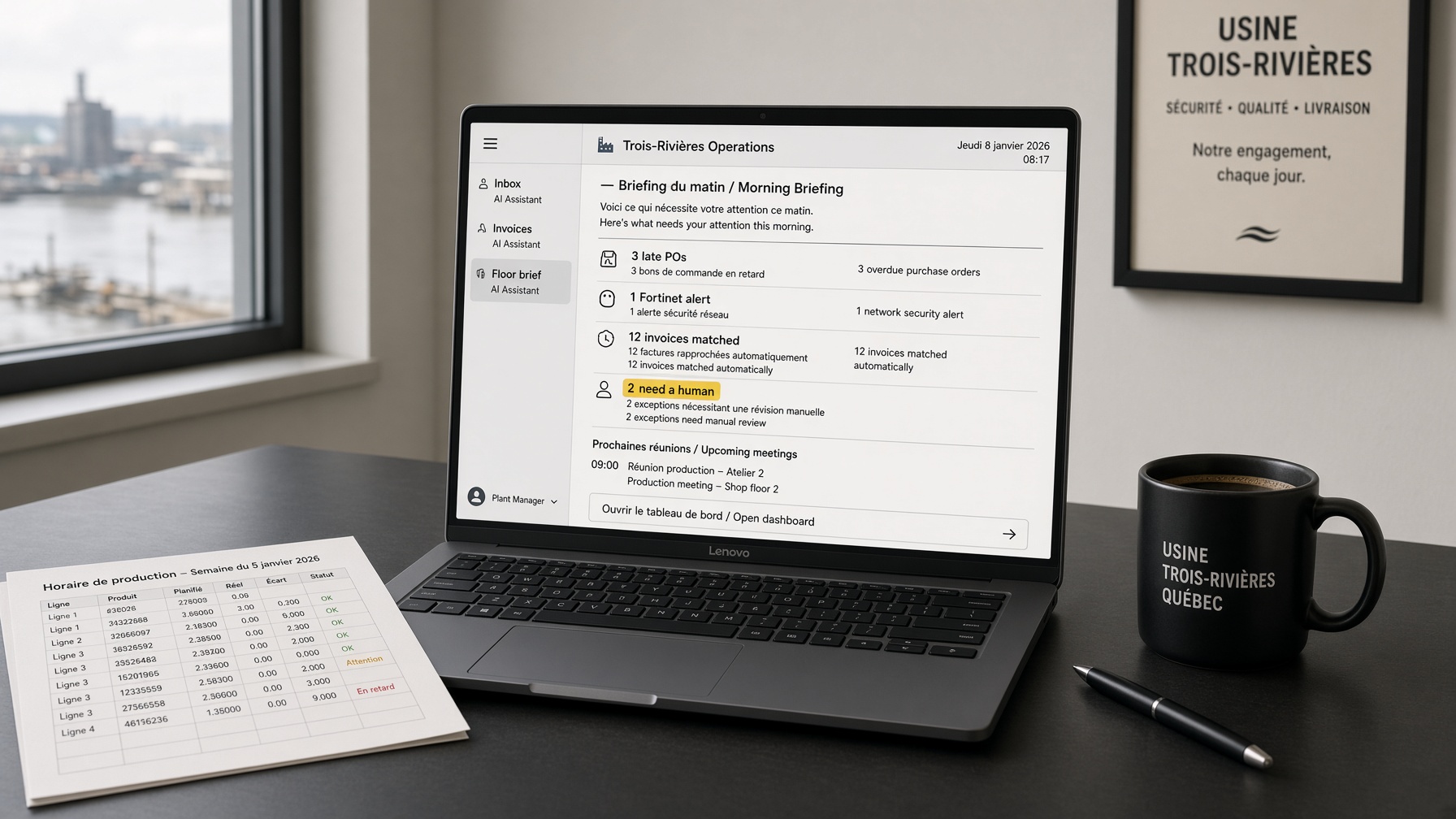
Scenario 4. The plant manager who does not live in Teams
xAI’s first suggested job is Chief of Staff: scan mail, calendar, notes, deliver a succinct readout with a source and a next step. For a GM in Mauricie, the inputs are not Slack. They are a shared mailbox, a production schedule on paper, a Fortinet alert, three late POs, and a customer who called the cell.
Bot named Floor. Routine at 6:30 a.m.: read the mailbox, the open exceptions from Receiving and Invoices, the weekday digest if you are a GOX client, and yesterday’s shipments. One page. Sources named. Nothing sent to a customer. If the Bot cannot see the ERP, it says so, instead of inventing a quantity. That humility is a setting you write on day one, in the same sentence as the approval rule.
What we would not let it do. Yet.
Post in Infor Visual. Talk to a PLC. Reset a firewall rule. Mail a customer from the company domain on its own. Sit on a laptop that is also used to pay suppliers. Those are irreversible, or they share the blast radius. xAI’s enterprise waitlist exists for a reason: Grok Bot today is a capable personal teammate on a SuperGrok or Cursor plan, not a governed plant system with your Entra ID, your Fortinet, and a paper trail a buyer can audit.
That is our lane. If you want the Bot, we will put it where xAI wants it: named, shown once, routine on a schedule, approval on send. If you want it next to the ERP, we build the small product that already knows the open PO, with a human gate, on the Microsoft and Lenovo stack we already operate. Grok Bot can draft. The plant still posts.
A one-week trial that will not embarrass you
Monday: pick one mailbox that already hurts (receiving or AP). Create one Bot. Write three rules on a sticky note: what it may read, what it may draft, what it may never send. Tuesday: sit with it once and do the real job in front of it, the way xAI tells you to. Wednesday to Friday: let the routine run. You only open the approval pile. Friday at 3 p.m.: count hours given back, errors, and the one scare. If the scare is “it almost posted”, you just learned the gate is doing its job. If there was no scare because you never connected the ERP, even better.
Grok Bot is new, and it is the first consumer agent we have seen that talks like a coworker instead of a wizard. For a shop in Mauricie, that is interesting. It is not a reason to skip the desk that already watches the tenant, the dock, and the firewall. Show the Bot the work. Keep the pen. Call us if you want the week to be set up by people who have seen the fax machine and the copilot in the same afternoon.